Aelo is mentioned throughout because we built it — the criteria below apply to any vendor. If you run sales on Bitrix24, the right call analytics tool should feel like a part of Bitrix24 — not a separate dashboard your managers forget to open. This guide is for SMB and mid-market teams choosing between general-purpose call analytics platforms and Bitrix24-native ones.
What “AI call analytics for Bitrix24” actually means
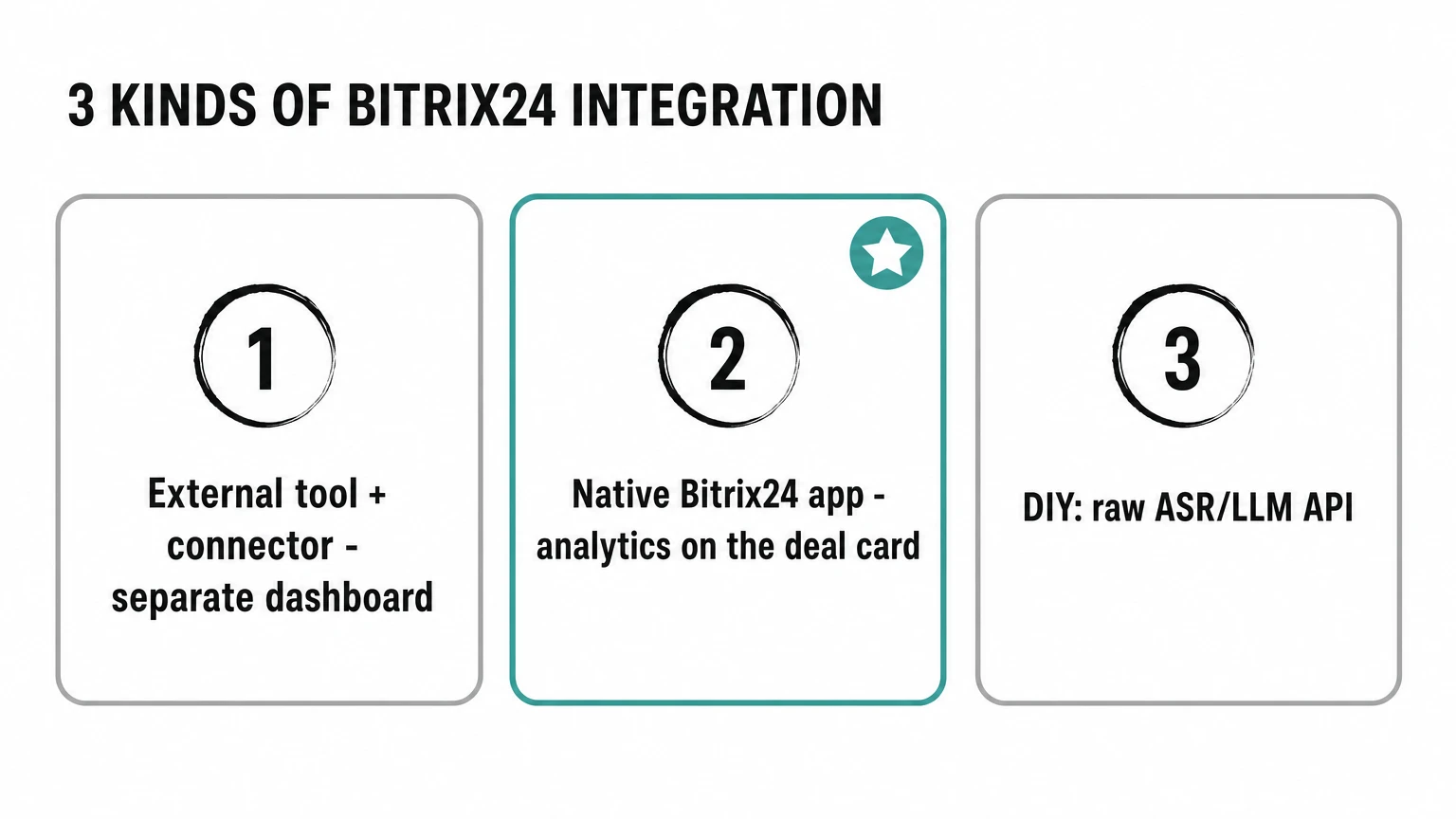
A modern call-analytics platform listens to every sales conversation, transcribes it, and extracts structured signals — quality score, sale probability, objections raised, compliance flags — that managers can act on. For a Bitrix24 team, “Bitrix24 integration” can mean three very different things, and only one of them puts the analysis where the work happens.
- External tool with a Bitrix24 connector. The platform receives Bitrix24 webhooks or pulls call recordings via REST. Analytics live in a separate dashboard. Managers have to switch tabs.
- Native Bitrix24 application. The platform installs as a Bitrix24 app. Analytics show up directly on the lead, deal, or contact card; tasks and reminders are created in Bitrix24; managers never leave the CRM.
- Generic ASR/LLM API. ASR is automatic speech recognition — the raw transcription layer. What you get is a developer toolkit: you assemble the pipeline yourself.
For most SMB sales teams, option 2 is the only one that produces durable adoption. Option 1 looks the same in a demo and dies after onboarding because nobody opens the second dashboard.
Six criteria for a Bitrix24 buyer
Use this short checklist when you shortlist vendors. Each item should be answerable yes/no in a 30-minute demo.
1. Does the platform install as a Bitrix24 app?
Ask the vendor to install the app in your Bitrix24 portal during the call. If they need to schedule a separate technical session, you are looking at a connector rather than an application. The product should appear under Applications and add widgets to the lead and deal cards.
2. Where does the analysis verdict appear?
After a call ends, the verdict (score, tags, objections, next-step suggestion) should appear:
- On the deal or lead card in Bitrix24, as a structured field that managers and supervisors can filter on.
- As a task or reminder when the call is flagged for review or coaching.
- In the timeline of the lead/deal, so the team can see the conversation context next to the analysis.
If analysis only lives in an external tool, you are paying for a parallel dashboard.
3. How is the scorecard defined?
A scorecard is the list of criteria every call gets graded on. Each team defines a good call differently, and a serious tool lets you write that definition down without a developer:
- A scoring builder with named criteria, weights, and pass thresholds.
- The ability to version scorecards, A/B them between teams, and export the JSON.
- Version history — which scorecard version evaluated each call and what criteria that version contained.
If the scorecard is hard-coded by the vendor, you cannot evolve it as the business changes.
4. What happens with PII?
Sales calls carry personal data. Four questions, each answerable yes or no in the demo:
- Does it redact PII — phone numbers, emails, payment-card numbers, IBANs?1
- Does it publish its sub-processors — the outside vendors that touch your audio and text — as a page you can open?
- Is there a DPA you can sign as it stands?
- For EU teams: where is content stored, where does compute run, and which legal entity is the processor?
5. How is the pricing structured?
Look for three things:
- Public list price. If the price is “talk to sales,” budgeting is hard and procurement is slow.
- Predictable pricing. Look for plans with included monthly minutes and a clearly published per-minute rate beyond them, plus budget alerts — so overage is a known, visible number rather than a surprise.
- Self-serve start. A free tier with a published minute allowance and no credit card lets you measure the ROI on your own calls before signing.
6. Time to first analysis
Demand a concrete number. The right answer is “minutes from connecting your Bitrix24 portal.” If the answer is “a few weeks of professional services,” you are looking at an enterprise platform — fine if you are an enterprise, expensive otherwise.
Frequently asked questions
Does Bitrix24 already have built-in call analytics?
Yes, within limits — and it is worth being precise about it. Bitrix24’s built-in AI (CoPilot, rebranded BitrixGPT in 2026) transcribes a call, writes a summary, fills the CRM card and scores the call against a sales script you write in plain text, with a rating per manager (Bitrix24: AI Speech analytics and Sales scripts). Each call is processed by hand and draws on the portal’s request allowance. If a script check inside the portal is what you’re after, that may be enough.
What it does not give you is a structured scorecard — separate parameters scored one by one, with quotes from the conversation as evidence — or analysis of recordings that never reach Bitrix24. A specialised analytics tool adds that layer on top of Bitrix24’s recording infrastructure. Our honest Aelo vs Bitrix24 comparison covers where each one fits — and because Bitrix24’s built-in AI is evolving quickly, confirm its current capabilities in Bitrix24’s own documentation.
Do I need a separate ASR vendor?
You probably do not. Most call-analytics platforms — including Aelo — bundle ASR (in Aelo, speech recognition and LLM analysis are part of the price — the full sub-processor register is public) so you do not pay a separate vendor per minute. Confirm whether the vendor lets you bring your own ASR keys if you have an existing contract.
What about non-call channels?
If your sales team also handles chats and messengers, you want a platform that can ingest text conversations alongside calls and produce comparable analytics. Otherwise you end up with two scoring systems.
How long does onboarding take with a Bitrix24-native tool?
Self-serve onboarding for a Bitrix24-native tool should take about 15 minutes — install the app, point it at the telephony of your choice, define a starter scorecard, run the first 10 calls through analysis, then iterate.
Where does Aelo fit?
Aelo, built by Grow2.ai, is a Bitrix24-native call analytics platform for SMB and mid-market teams. It installs as a Bitrix24 app and scores each analyzed call against a scorecard you control. For new transcripts processed through current application write paths, it redacts supported phone, email, payment-card and valid IBAN patterns on write and before LLM analysis; original audio and earlier rows are unchanged. Customer content is stored at rest in the EU (in the database and the audio storage; the search index — numerical vectors, no text — and Cloudflare’s processing state, queues, logs, caches and coordination state, some of which hold transcript and chat text for a few days, are not pinned to the EU), while Cloudflare edge processing may occur outside the EU (edge processing means a request is handled at the Cloudflare location closest to it). Public plans start at $59/month, with a free tier of 100 analyzed minutes.
Take the six questions into the demo
The list above is the whole guide: six questions, six yes/no answers, one 30-minute call per vendor. Ask them in the same order every time and the shortlist sorts itself — the tools that need a follow-up session for question 1 rarely recover by question 6.
If you are drawing up that shortlist now, our comparison hub covers the pairings buyers ask about most.
Footnotes
-
Two follow-ups worth asking on redaction: whether it applies only to current write paths, and whether original audio and records created before the control stay unchanged. Both limits are common, and both matter in an audit. ↩